
MailGate
Protective markings are enforced properly on the desktop and, on most fleets, barely at all on mobile. MailGate closes that gap.

Protective markings & read-only email for government.
MailGate brings protective markings and read-only email to government — classifying, controlling and auditing email handling in line with the EPMS and the PSPF.
Most mobile mail clients treat a protective marking as text in a subject line. They will happily let a user forward a PROTECTED email to a personal address, save the attachment to a consumer cloud, or reply without a marking at all.
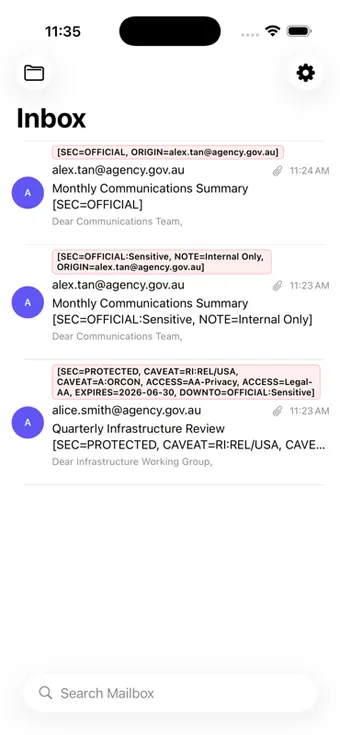
MailGate parses markings properly — including [SEC=…] and X-Protective-Marking headers under the 2025.1 EPMS — and enforces handling rules on the device: what can be forwarded, what can be saved, what can be opened and what is simply read-only.
- iOS
- Android
- Exchange Online
- Microsoft 365
What it does
EPMS & PSPF conformant
Classification, caveats, access markers, expiry and notes handled to the standard.
2025.1 marking parsing
Understands [SEC=…] and X-Protective-Marking headers, including caveats and information management markers.
Read-only email
Messages above a defined classification can be read on the device without being forwarded, copied or exported.
Controlled attachments
Attachment handling restricted by classification, with no persistent caching on the device.
Marking on compose
Users cannot send an unmarked message — the marking is applied and validated before it leaves.
Audit trail
Handling events logged and exportable to your SIEM for investigation and assurance.
Business benefits
- Protective markings enforced on mobile, not just on the desktop
- Higher-classification mail readable on a handset without becoming portable
- No persistent attachment cache to recover from a lost device
- Evidence that markings were applied and honoured
Who it is built for
- Commonwealth and state agencies operating under the PSPF
- Organisations that have restricted mobile mail because markings could not be enforced
- Environments preparing for EPMS 2025.1 conformance
Common questions about MailGate
How is this different to the protective marking add-ins we use on the desktop?
Desktop add-ins enforce markings in Outlook on a managed workstation. MailGate enforces them on the handset, where most fleets have no enforcement at all — which is why mobile mail is often restricted or classified down.
Does it support the 2025.1 EPMS?
Yes. It parses [SEC=…] and X-Protective-Marking headers including caveats, access markers and information management markers, and validates a marking on compose before a message can be sent.
What does "read-only email" actually mean?
Messages above a classification you define can be read on the device but not forwarded, copied or exported, and their attachments are not cached persistently. It lets people stay informed on mobile without the content becoming portable.
Does it work with Exchange Online?
Yes, and with hybrid configurations. Deployment is through your MDM with configuration applied at enrolment, so users do not enter server details.
Our other products

Secure Your Contacts
A governed contact container for managed fleets — directory contacts on the handset without exposing the directory.
Learn more
CDTS Secure Camera Application
Operational photography that never touches the camera roll — captured, encrypted and delivered straight to your repository.
Learn moreRequest a walkthrough of MailGate
We will show you the product against your environment, your policy and your classification model — not a generic demo tenancy.